

Loocey DB
The No-Code Relational Database Built on Real PostgreSQL
Build Database Apps with Real Tables, 50+ Column Types, Foreign-Key Relationships and Views Your Whole Team Can Use.
- Dedicated PostgreSQL Database
- 50+ Column Types
- Real Foreign Keys
- Table, Kanban & Calendar Views
- MCP Server for AI
Apps
- Every account gets a dedicated PostgreSQL database instance
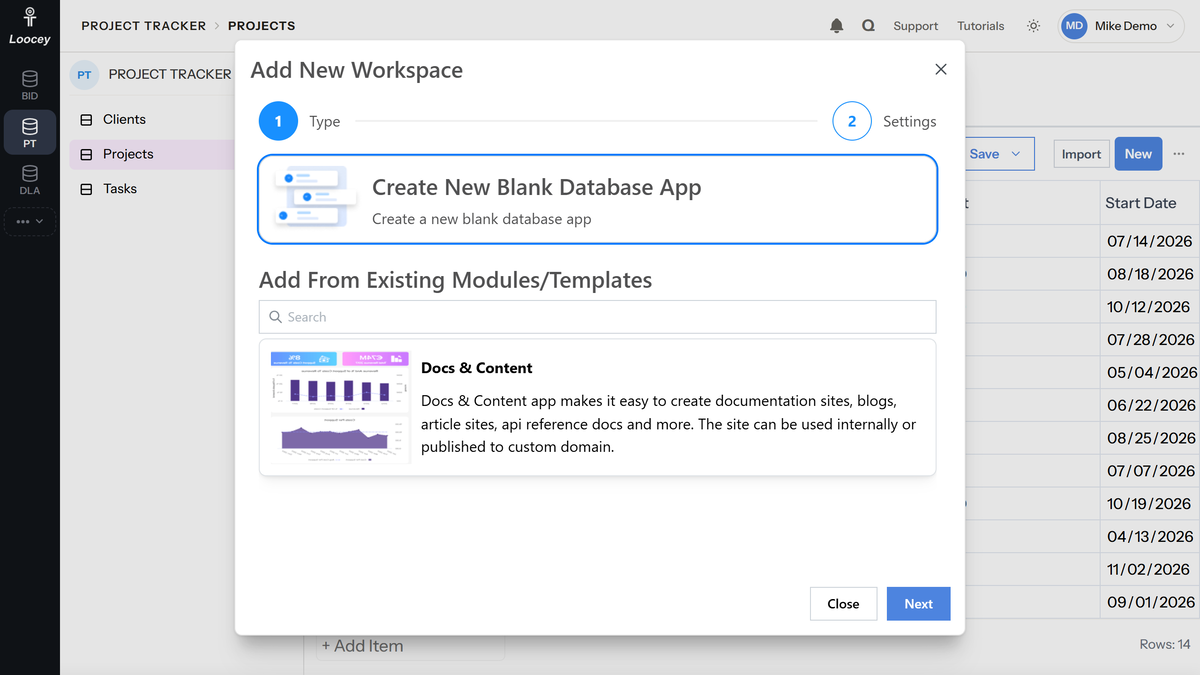
- Create blank Apps or start from existing templates
- Add tables, folders, view shortcuts and links to each App
- Drag, drop and reorder menu items as needed
Tables
- Tables are real PostgreSQL tables, not JSON-based storage
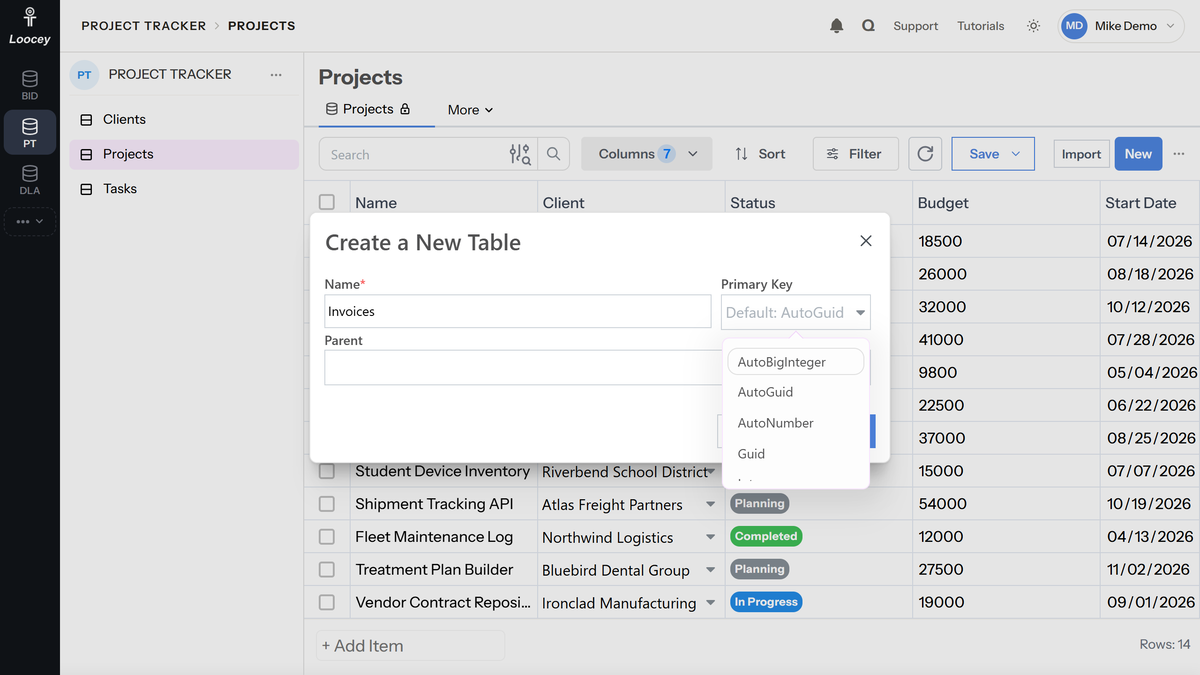
- Choose the primary key type: AutoGuid, Guid, AutoNumber, AutoBigInteger, Integer or String
- Create tables from a SQL script and export your schema as PostgreSQL DDL
- Add indexes, including composite indexes, and unique constraints
Columns
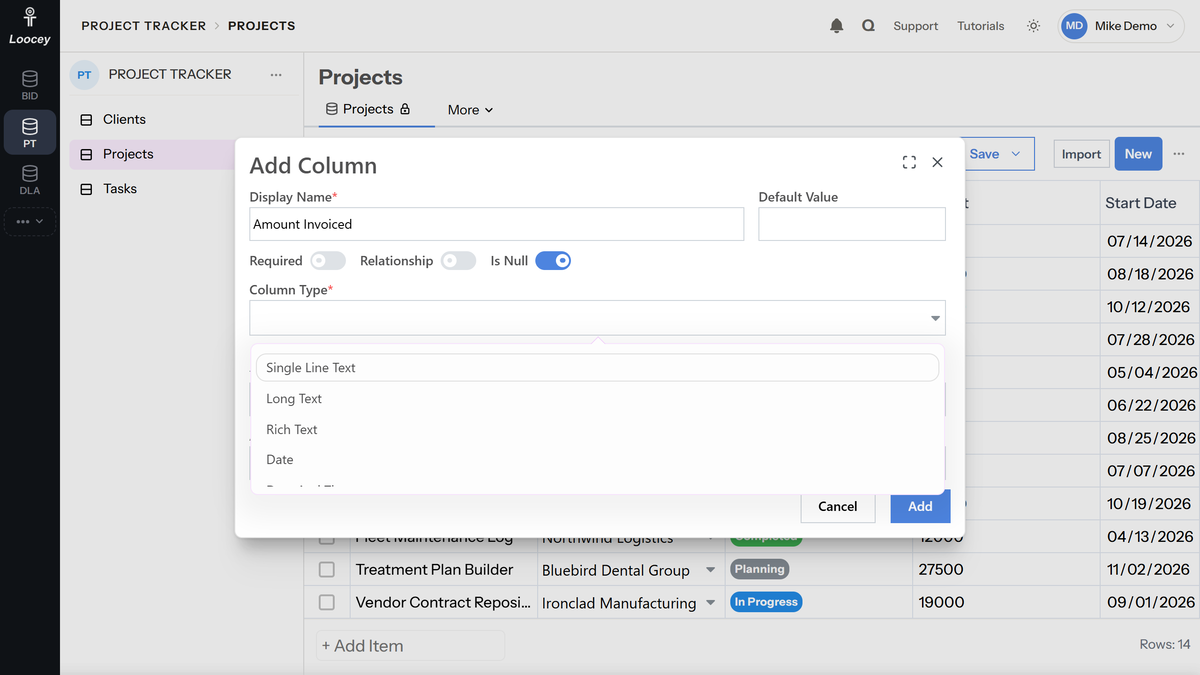
- Creating a column in the list creates the column in the database with a matching type
- Status and dropdown columns with integer, GUID or string values
- Required, unique, regex and min/max length validation
- Calculated, file, people and ready-made dropdown columns
Relationships
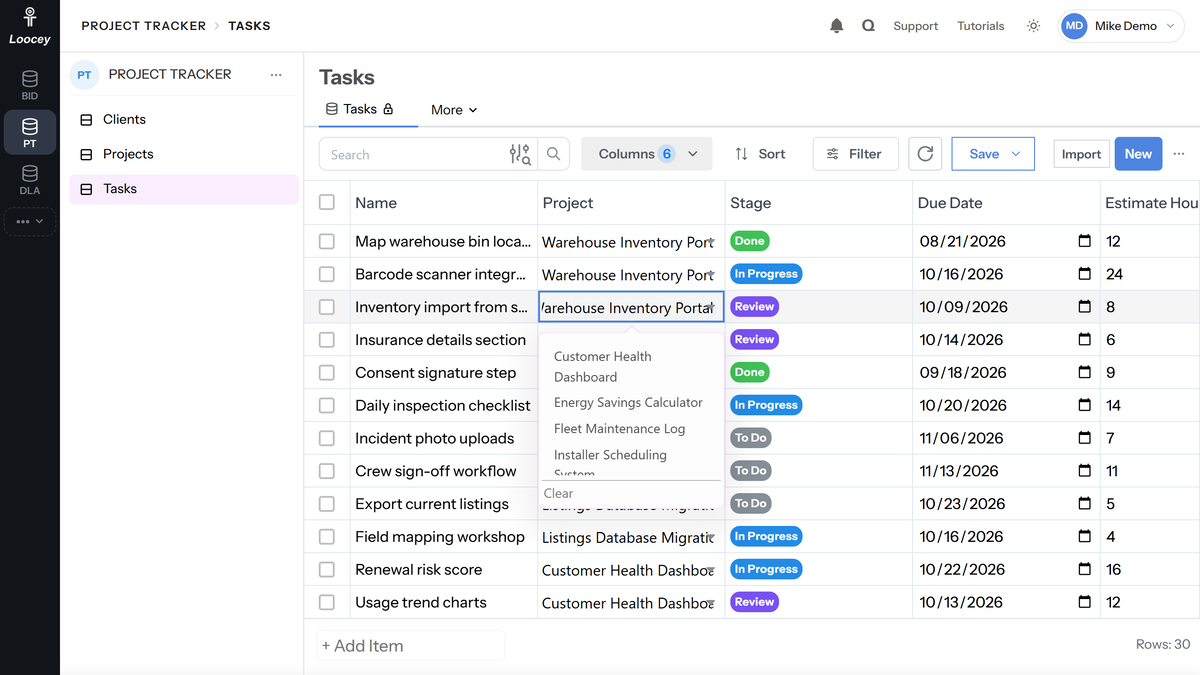
- Relationship columns create actual foreign keys in the database for data consistency
- Choose On Delete rules: Cascade, Restrict, Set Null or No Action
- Relate tables across Apps in the same account
- View related records on detail pages (e.g., tasks linked to a project)
- Existing Relationship columns and dependent dropdowns
Customer Reviews
Loocey has made it easy to filter through solicitations, saving me hours of research and allowing me to effectively manage my pipeline so I can focus on winning contracts.
I have tried several government contracting bid aggregator services, and LOOCEY is by far the best. The powerful and extensive filters allow the user to sort through massive amounts of data in seconds, which allows a faster research to bid-placing process. The bulk email sender, which generates pre-formatted emails, and the newly released print label function are game changers! LOOCEY is on pace to rival the big name bid aggregators in the govcon space.
We’re happy to say as well Loocey has dramatically improved our efficiency, we’re getting almost twice the amount of bids in now. (After 1 month of using Loocey)
Search & Filters
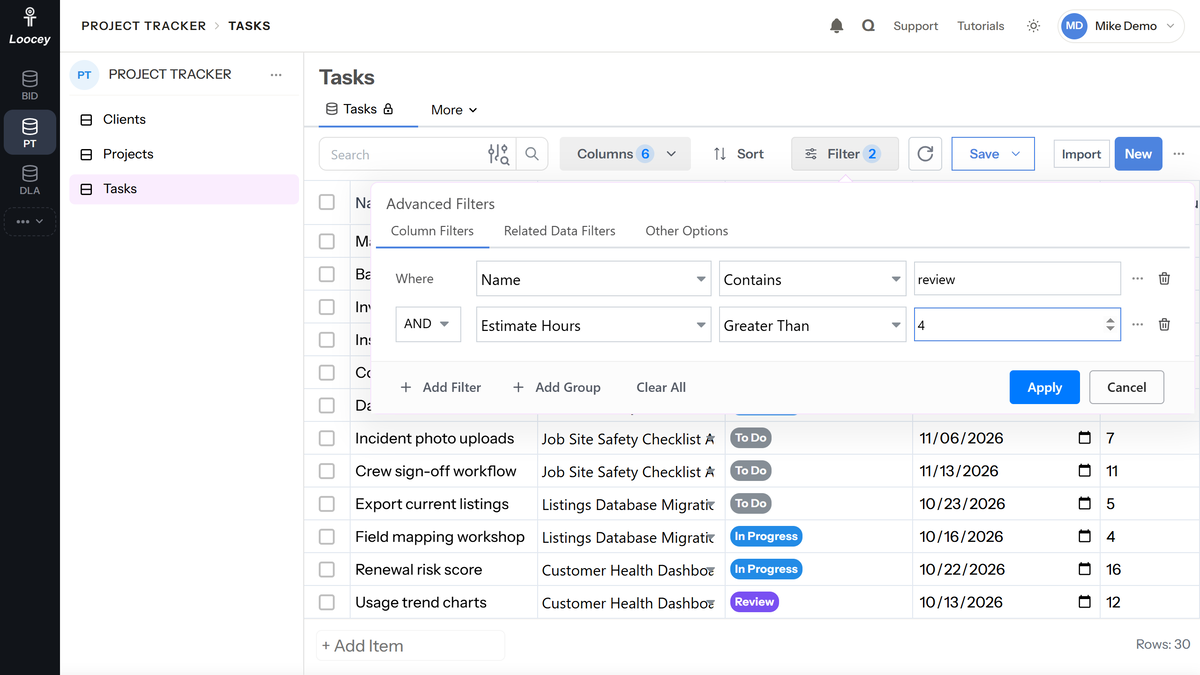
- Combine filters with AND/OR groups to narrow down your results
- Filter by data in related tables and use dynamic dates such as this week or last month
- Apply multiple sorts to organize data (by date, quantity, status, etc.)
- Search the columns you choose, and show or hide columns to keep your view focused
Saved Views
- Reorder or resize columns by simply dragging them around
- Save the current view or use "Save As" to create a new view
- Views show as tabs at the top of the table for easy switching
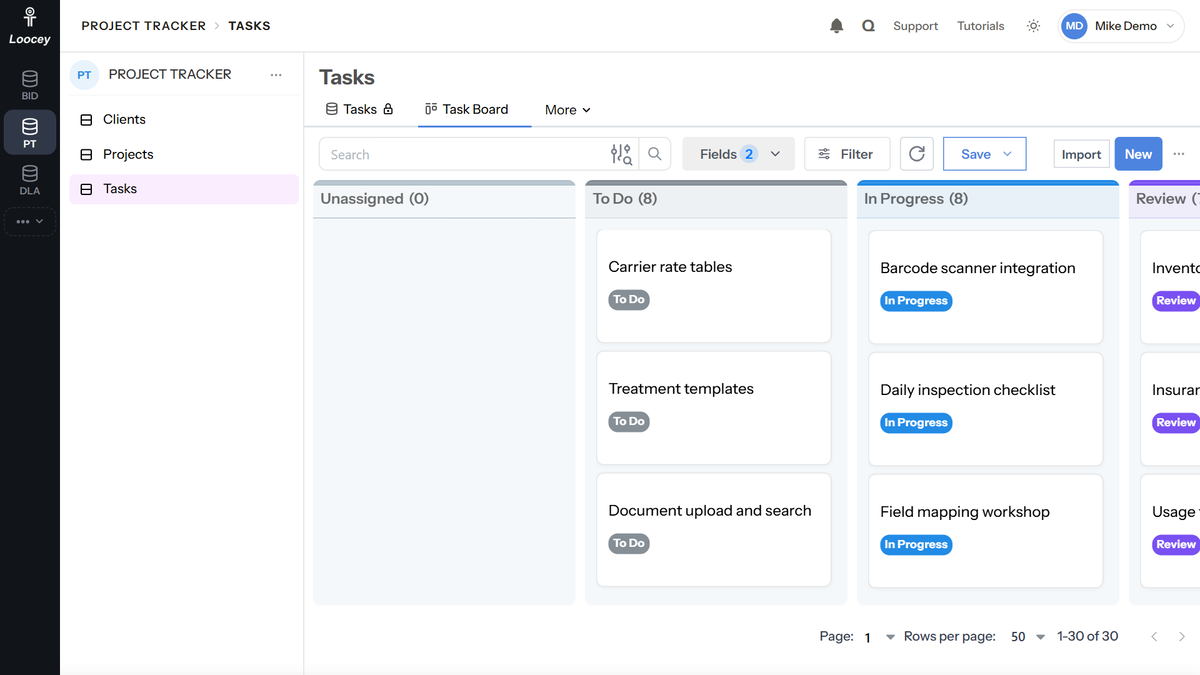
- Table, Kanban/Pipeline and Calendar view types
Kanban Views
- Create a Kanban view and select the column used as Kanban sections
- Familiar drag and drop for moving and reordering cards
- Select additional fields to appear on each card
- Save customized Kanban views for quick access
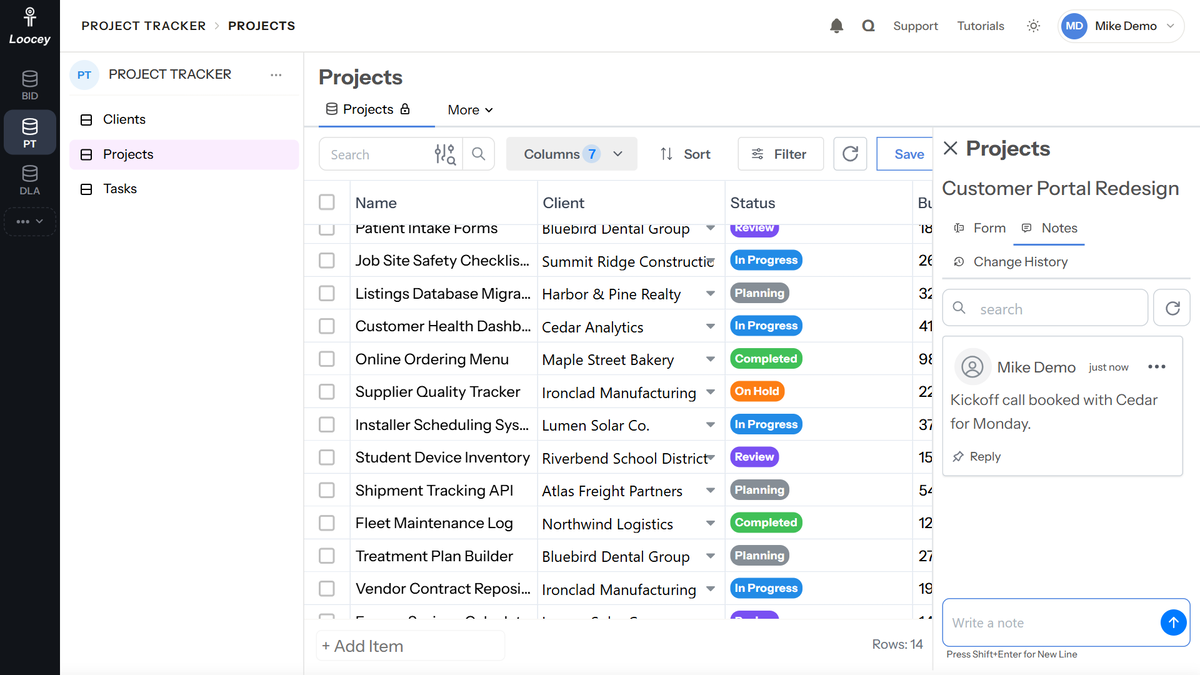
Notes
- Enter notes from the right panel for any record
- Reply to notes and pin the important ones
- Every note shows who wrote it and when
- Change history shows who changed what on every record
Creating Records
- Directly create and edit in the table view
- Click on the name to make edits in the right panel
- Right-click on a record name to open it in a new tab
- Import CSV, XLSX, XLS or TXT files up to 50 MB with column mapping
Updating Records
- Edit directly in the table view with Excel-style keyboard navigation
- Open the detail view and switch to edit mode for comprehensive changes
- Bulk edit selected records at once
- All changes are saved to your database immediately
Features
A real relational database, without the SQL
Loocey DB combines the power of a PostgreSQL database with an interface built for non-technical teams. Build a Database App for each process in your business, link your tables with real relationships, and give every team the views and filters it needs.
Organize your business into Database Apps
An App is a database for one team, process or division of your business. Each App holds real PostgreSQL tables, folders and shortcuts, arranged the way your team works.
- Database Apps for Every Process Create a blank App or start from a template, then give it a name, color and tag. Pin the Apps you use most.
- Real Database Tables Every table you create is an actual PostgreSQL table, not JSON stored in a document. Choose the primary key type: AutoGuid, Guid, AutoNumber, AutoBigInteger, Integer or String.
- Folders, Shortcuts and Links Organize the left menu with folders, view shortcuts and external links, and drag and drop items into the order you want.
- Create Tables From SQL Paste a PostgreSQL CREATE TABLE script to build one or more tables at once, or add and update columns with an ALTER TABLE script.
- Copy, Duplicate and Export Copy or duplicate a table into any App, and export the database schema (with sample rows) as PostgreSQL DDL.
50+ column types, stored as real typed columns
Adding a column in Loocey DB adds a typed column to the database table, with the constraints and options you would expect from a real database.
- 50+ Column Types Text, numbers, money, dates, statuses, dropdowns, tags, people, files, JSON, calculated values and more.
- Database-Level Options Default values, required fields, unique values, validation regex, min and max length, and database indexes, including composite indexes.
- Calculated Columns Calculated Number and Calculated Value columns, plus database-calculated (generated) columns and value formatting templates.
- Status and Dropdown Columns Color-coded statuses and dropdowns with integer, GUID or string values, and options you can edit inline.
- Change Your Mind Later Change a column’s type later (for safe conversions), rename it, or change a table’s primary key type with IDs and relationships remapped for you.
Relationships backed by real foreign keys
Link tables the way a database should: relationship columns create actual foreign keys, so your data stays consistent as it grows.
- Real Foreign Keys Relationship columns create a foreign key in the database, with On Delete rules: Cascade, Restrict, Set Null or No Action.
- Relate Across Apps A relationship can point to a table in another App in the same account, so separate teams can still share data.
- Joins Without SQL Existing Relationship columns bring in any column from a related table, read-only, like a join.
- Related Records on Detail Pages Show a view of the related child table on each record’s detail page, for example every task linked to a project.
- Relationship Dependencies Dependent columns filter one dropdown by another, such as showing only the contacts that belong to the selected company.
Table, Kanban and Calendar views with powerful filters
Save any combination of filters, sorts and columns as a view tab, then switch between Table, Kanban/Pipeline and Calendar views of the same data.
- Table, Kanban and Calendar Views Drag and drop cards on Kanban/Pipeline boards, choose the fields on each card, and plan by day, week or month on the Calendar.
- Saved Views as Tabs Save the current view or use Save As for a new one. Views show as tabs at the top of the table, and you can pin them.
- Advanced Filters Combine conditions with AND/OR groups, and use operators such as In, Contains Any, Between / Date Range, Is Empty and Days Greater Than Today.
- Related Data and Dynamic Filters Filter by data in related tables, pull filter values from another table, and use dynamic dates that always mean today, this week or last month.
- Sort, Search and Arrange Sort by several columns, search the columns you choose, and show, hide, reorder or resize columns.
Work with records the way your team prefers
Edit in the grid, in a side panel or on a full detail page, keep notes on any record, and move data in and out with imports and exports.
- Edit Anywhere Edit cells inline with Excel-style keyboard navigation, or open a record in the right panel, a popup or its own detail page.
- Notes on Every Record Write, reply to, pin and search notes on a record. Every note shows who wrote it and when.
- Files in Your Tables Single File and Multiple Files columns store documents and images right on the record.
- Import CSV and Excel Import CSV, XLSX, XLS or TXT files up to 50 MB, map each column, and choose to skip or update duplicate records.
- Export and Bulk Edit Export the current page, all data or selected rows to CSV, bulk edit selected records, and add a summary row with totals.
Column Types
56 column types to model any data
Every column is created in the database with a matching type. Pick a ready-made dropdown, assign records to people, store files, calculate values from other columns or pull them in from related tables.
Text & Content
Short and long text, formatted text and structured data.
- Single Line Text
- Long Text
- Rich Text
- String
- Password
- JSON
Numbers & Money
Numeric columns stored with matching database types.
- Number
- Integer
- Small Integer
- Big Integer
- Money
- Progress
- AutoNumber
- AutoBigInteger
- Integer Array
Dates & Times
Dates, ranges and time-based columns.
- Date
- Date Range
- Date And Time
- Month and Year
- Time
- Week Of Year
- Time Estimate
Choices & Status
Pick-lists, statuses and toggles.
- Status
- DropDown
- Multi-Select Dropdown
- Tags
- Color
- CheckBox
- Switch
Ready-Made Dropdowns
Dropdowns with their options already filled in.
- Yes/No
- True/False
- Checked/Unchecked
- On/Off
- Active/Inactive
- Enabled/Disabled
- Countries
- USA States
- Currencies
- Timezone
People
Assign records to the users on your team.
- User
- People
- Assignee
- Assignees
Contact & Web
Columns that validate and link contact details.
- Phone
- Website
- Social Media Profile Link
IDs
Unique identifiers, including auto-generated GUIDs.
- Guid
- AutoGuid
Calculated & Related
Values computed from other columns or pulled from related tables.
- Calculated Number
- Calculated Value
- Relationship
- Existing Relationship Column
Files & Vectors
Documents, images and vector data.
- Single File
- Multiple Files
- Vector (pgvector)
Plans
Ready to see what Loocey DB costs?
Every plan includes a group of users, file storage and a dedicated PostgreSQL database for your account. Compare the plans feature by feature on the pricing page.
AI & MCP
Let your AI assistant work in your database
Loocey DB includes an MCP (Model Context Protocol) server, so a compatible AI assistant can build and update your Apps for you: tables, columns, records, filters and saved views, using plain-language requests.
-
Create and Update Tables
Ask your AI assistant to create a table, rename it, move it to a folder, set its primary key type or add indexes.
-
Create and Update Columns
Add columns of any type, make them required or unique, set defaults, and create relationships between tables, even across Apps.
-
Create, Update and Delete Records
Add or update records in batches, set dropdown values by their labels and assign records by name or email, with an optional note on each record.
-
Search and Query Your Data
Read records with filters, sorting and search, open a single record with its notes and change history, and get counts grouped by any column.
-
Create Filters and Saved Views
Build and update the same saved views your team uses in the app, with filters, columns and sorting.
-
Import Spreadsheets
Import CSV and Excel files with column mapping, and update or skip duplicates.
-
Secure by Default
Your AI assistant acts as a real Loocey user with that user’s role, and every change it makes is recorded in the change history.
Loocey Apps Integration
Works with Loocey CRM, Sales & Inventory, Docs and more
Loocey’s business apps are separate products that are directly integrated with your Loocey DB databases. They run in the same account database as your own Apps, so your tables and their records can reference each other without any sync, export or third-party connector.
-
One Account Database
Loocey apps keep their data in the same dedicated PostgreSQL database as your Loocey DB Apps, so there is nothing to sync and no third-party connector to maintain.
-
Relate Your Tables to App Records
Relationship columns can point to tables in other apps, with real foreign keys. Link your own Projects table to CRM clients, for example.
-
Custom Fields on App Records
Add custom fields to CRM and Sales records to capture the details your business needs.
-
One Login for Your Team
Your team signs in once to one Loocey account, and you invite and manage every user from the same Admin Panel.
-
Loocey App
Loocey CRM
A full CRM for leads, contacts, clients and deals that lives in the same account database as your Loocey DB Apps.
- Leads, contacts, clients and vendors
- Deals pipeline with stage history and won/lost
- Activities, notes, calls and tasks on one timeline
- Inbox with Gmail and Outlook email sync
-
Loocey App
Loocey Sales & Inventory
Quotes, orders, invoices and inventory that connect to your CRM clients and your own tables.
- Quotes, orders, invoices and payments
- Purchasing and receiving
- Stock levels, movements and transfers
- Accounts receivable and payable aging reports
-
Loocey App
Loocey Docs
Documentation, guides and presentations built in the same account as your data.
- Page and step editor with a visual canvas
- Presentation mode
- Page versions and import/export
- Search across every page
-
Loocey App
Loocey DLA
All-in-one software for DLA/DIBBS suppliers, built on top of Loocey DB.
- Daily DLA/DIBBS solicitation import
- CRM bidding board
- Automated supplier RFQ emails
- Bid pricing and MIL-STD-129R labels
Team & Security
Your own database, your team, your rules
Invite your team, decide what each role can do, and keep a full history of every change.
-
Dedicated PostgreSQL Database
Every Loocey account gets its own dedicated PostgreSQL database instance. Your data is not stored alongside other accounts’ tables.
-
Roles & Permissions
Built-in Admin, Team Member, Viewer and Commenter roles, plus custom roles with permission toggles for Apps, tables, columns, views, records, notes and more.
-
Invite Your Team
Invite one user or many at once from the Admin Panel, assign roles, resend invitations and deactivate users without deleting them.
-
Change History and Audit Log
See who changed what on every record, review table change history, and use the company-wide audit log.
-
API Keys
Create API keys for integrations. Each key has the same access as the user it was created for, and you can delete it at any time.
-
Jobs Queue
Imports, exports and bulk operations run as background jobs you can follow in the Jobs Queue.
Coming Soon
What we are building next
These features are in development and are not available yet.
- Coming Soon
Workflows & Automations
Automate repetitive work: run actions when records are created or changed, and schedule recurring jobs, without writing code.
- Coming Soon
Granular Access Controls
Fine-grained, object-level permissions: decide which users and teams can see or edit each App, table, field and record.
Video Tutorials
Learn Loocey DB in a few minutes at a time
Short tutorials that show the exact clicks. Watch all 64 videos on the Loocey Platform YouTube channel.
-
 3:46 Loocey DB Overview: Apps, Tables, Columns, Relationships and Views
 -
 3:27 How to Create and Use Multiple Apps in Loocey
 -
 6:04 How to Create Tables & Folders in Loocey
 -
 6:27 How to Use the Left Menu in Loocey
 -
 5:28 How To Create Relationship Columns In Loocey
 -
 2:54 How to do Joins or Create Existing Relationship Columns in Loocey
 -
 5:15 How To Use Relationship Dependencies in Loocey
 -
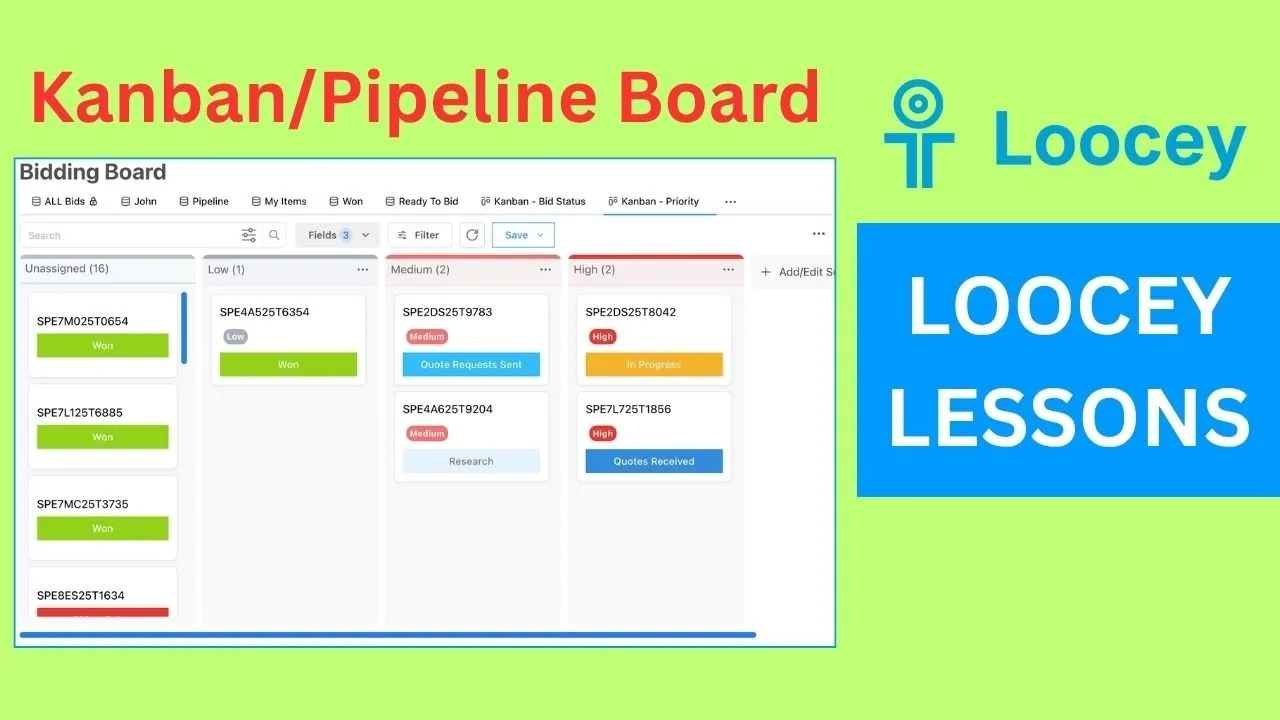 3:05 How To Create Kanban/Pipeline Boards in Loocey
 -
 2:02 How to Use Dynamic Date Filters in Loocey
 -
 4:19 How To Upload and Manage Files in Loocey
 -
 4:26 How to Create a Status Column in Loocey
 -
 5:56 How to Create a Calculated Number Column in Loocey
 -
 8:18 How to Create a Calculated Value Column in Loocey
 -
 4:17 How to Create a Multi-Select Dropdown Column in Loocey
 -
 2:34 How to Manage Roles & Permissions in Loocey
 -
 2:05 How to Invite/Add Users to Loocey
 -
 3:16 How To Use Loocey’s API Keys
 -
 21:49 Top Loocey Features: Deep-Dive Training
FAQ
Loocey DB questions, answered
What is Loocey DB? Product
Loocey DB is a no-code relational database and app builder. You build Database Apps with real PostgreSQL tables, 50+ column types, relationships backed by foreign keys, and Table, Kanban and Calendar views, without writing SQL. It was previously called Loocey Platform.
Is Loocey DB a real database? Product
Yes. Every Loocey account gets its own dedicated PostgreSQL database instance. Tables are real PostgreSQL tables with typed columns, relationship columns create real foreign keys, and you can add indexes and unique constraints. You can even create tables from a SQL script and export your schema as PostgreSQL DDL.
How much does Loocey DB cost? Pricing
Loocey DB has several plans, each with a group of users included, file storage and a dedicated PostgreSQL database for your account, with monthly or annual billing. See the Loocey DB pricing page at loocey.com/pricing/db for the current plans and prices.
What happened to Loocey Platform and Workspaces? Product
Loocey Platform is now called Loocey DB, and Workspaces are now called Apps (Database Apps). The features are the same; links to the old /platform page now go to /db.
Can I use AI assistants with Loocey DB? AI & MCP
Yes. Loocey DB has an MCP (Model Context Protocol) server, so a compatible AI assistant can create and update tables and columns, create, update and search records, build saved views and filters, and import spreadsheets. It acts as a real Loocey user with that user’s permissions.
How does Loocey DB work with Loocey CRM and other Loocey apps? Loocey Apps
Loocey CRM, Sales & Inventory, Docs and Loocey DLA are separate Loocey apps that store their data in the same account database as your Loocey DB Apps. Relationship columns can link your own tables to their records with real foreign keys, without any sync or third-party connector.
Can I import my data from spreadsheets or other tools? Data
Yes. Import CSV, XLSX, XLS or TXT files up to 50 MB, map each column to a new or existing column, and choose whether duplicates are skipped or updated. Most spreadsheet and database tools can export to CSV for import into Loocey DB.
Does Loocey DB have automations or workflows? Roadmap
Not yet. Workflows & Automations are coming soon. Today, imports, exports and bulk operations run as background jobs you can follow in the Jobs Queue.
Can I restrict access to specific tables, fields or records? Security
Today, permissions are managed with roles: built-in Admin, Team Member, Viewer and Commenter roles plus custom roles with permission toggles for Apps, tables, columns, views and records. Granular Access Controls, with permissions on specific Apps, tables, fields and records, are coming soon.
Does Loocey DB have an API? Developers
Yes. Admins can create API keys in the Admin Panel. Each key has the same access as the user it was created for, and Loocey DB plans include Main API access.
Build the database your business actually needs
Real PostgreSQL tables, 50+ column types and views your whole team can use, with users included in every plan.